Mark COPIAFACTS server window with color frame
$colorframe node color [all]
This command is used to identify a COPIAFACTS instance, especially for a system which runs multiple instances on the same node.
The parameters on this command are used as follows:
| node | the nodename affected, or * for all nodes (but this rather defeats the purpose). |
| color | the name of the color: the available names are: Black, Maroon, Green, Olive, Navy, Purple, Teal, Gray (or Grey), Silver, Red, Lime, Yellow, Blue, Fuchsia, Aqua, White. In addition you may specify any color by its hexadecimal R-G-B value (e.g. 0000FF for Blue). |
| all | a keyword to make the color appear whenever the nodename is used. Otherwise, the color frame will only appear when the COPIAFACTS instance is running in a multiple-node context (i.e. has been started with a node name on its command line). |
In addition to the color frame round the main part of the window, a matching color circle is also overlaid on the Taskbar icon for COPIAFACTS in Windows 7 and Server 2008 R2:
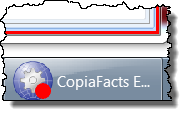
Example:
$colorframe M1 red
$colorframe M2 blue
