CopiaFacts InfoTips
This DLL library implements the CopiaFacts "Infotips" feature. You can select whether or not to install the infotip handler in the Installer selection dialog, and it will only be reinstalled on an upgrade if changes have been made to this DLL. If Windows Explorer (or an Explorer replacement which supports shell extensions) is running at installation or uninstallation of the DLL, a reboot will be required on completion of the CopiaFactsServer installer operation.
After installation, a pop-up infotip window will display when you hover your mouse over most types of CopiaFacts command file in Windows Explorer. The display summarizes the contents of the file.
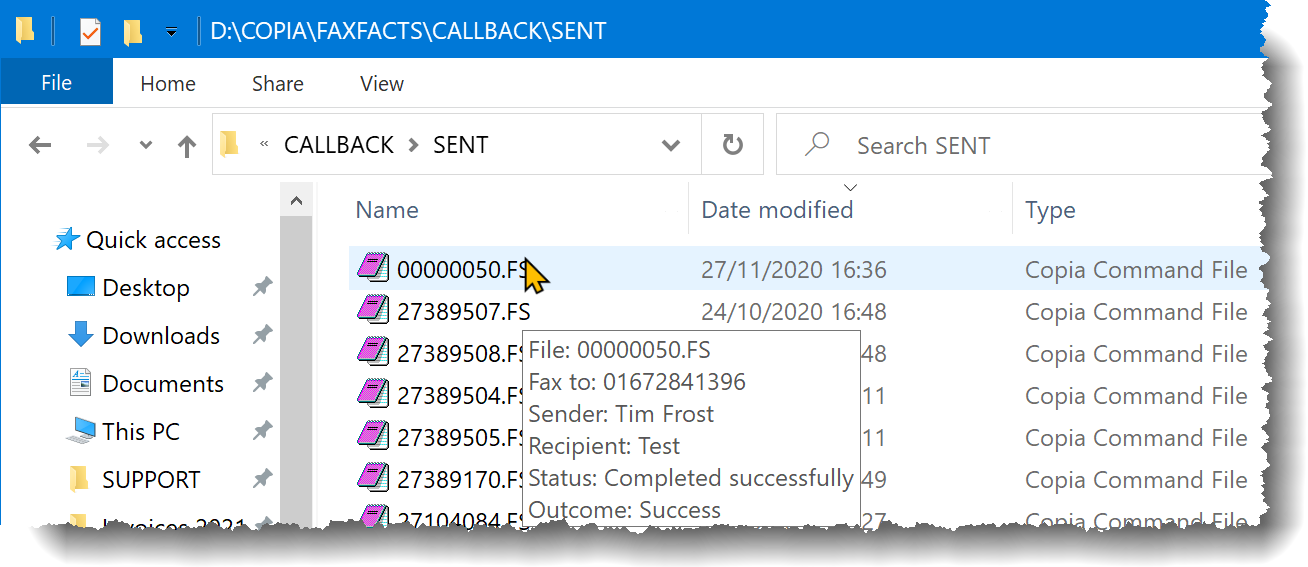
Currently a version of the DLL is installed only on 64-bit Windows, and will be installed in the Windows System32 folder. A copy of CF9REG64.DLL is also installed in Program Files (x86)\Copia for use by CF9INFOTIP64.DLL.
Infotip displays are provided to summarize the contents of CopiaFacts command files and to show the first-page TIF tags of a TIF or GTT file.
If you find the infotips distracting, you can disable the shell extension from an Administrator command session using the command:
REGSVR32 /u C:\WINDOWS\SYSTEM32\CF9INFOTIP64.DLL
