Debugging output is controlled by checkboxes on the COPIAFACTS Options Page, Debug sub-page. Debug output is sent to screen or file depending on the Trace Options settings. Normally there is no need to enable debug settings unless Copia support staff are investigating a problem for you.
 | Whenever you set any debugging options, you should always enable Trace Processing States on the Trace Options screen, so that a context is available for the debug messages. |
Please note that some of these trace options can produce huge amounts of trace output, and may seriously degrade the performance of your CopiaFacts system if left enabled unnecessarily.
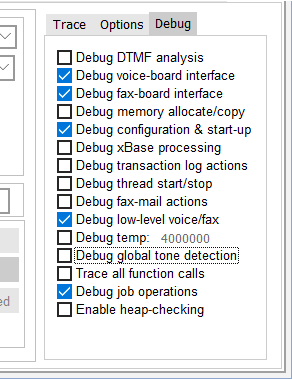
The following debug checkboxes control the debug output:
| DTMF analysis | Traces all attempts to gather DTMF input and all incoming DTMF items. This setting also picks up details of DNIS and ANI processing, even when this data is acquired digitally rather than from in-band DTMF. |
| Voice-board interface | Traces all play and record operations and the results for each that are returned from the board interface API. |
| Fax-board interface | Traces all send, poll and receive operations, and the results returned for each by the board interface API. For Brooktrout boards, some voice debugging messages are also enabled by this setting. |
| Memory allocate/copy | Traces all memory operations. Do not enable this debug trace unless specifically requested to do so by Copia support staff. |
| Configuration and startup | Traces all configuration steps, including board and channel detection. If needed, this checkbox must be set before you click the Start button. |
| Transaction log | Traces log file operations. Log file writes are buffered so there are several stages to writing a single log item to disk. |
| Thread start/stop | Traces thread operations. Do not enable this debug trace unless specifically requested to do so by Copia support staff. |
| Fax mail | Traces the processing of incoming faxes. |
| Low level voice/fax | Traces additional information from the board interface API. Do not enable this debug trace unless specifically requested to do so by Copia support staff. |
| Temporary messages | Used for special purposes under the direction of Copia support staff. When checked, this option also requires a code to be entered in the adjoining field. Each code value entered is a 32-bit hexadecimal value, with each controlled feature identified by a value containing a single 1-bit. When more than one code is to be specified, the value is the result of a OR operation on all the included feature values. For example, to combine features 400 and 800, enter a hexadecimal value C00. |
| Global tone detection | Traces all $global_tone events and their interpretation. |
| All function calls | Traces all function calls. Do not enable this debug trace unless specifically requested to do so by Copia support staff. |
| Job operations | Traces all interaction with the job admin DLL CF9JOBADM.DLL. |
| Heap checking | Checks the heap integrity at allocation and freeing of memory. Do not enable this debug trace unless specifically requested to do so by Copia support staff. This option cannot be changed after the main program has started. |
