A button in the main window allows a set of automatic triggers to be set up, so that an e-mail is sent (by default to the recipients shown in the main EMSETUP window) when the associated event occurs. Normally a default recipient should be the local system administrator. Separate override recipients may be specified for each trigger.
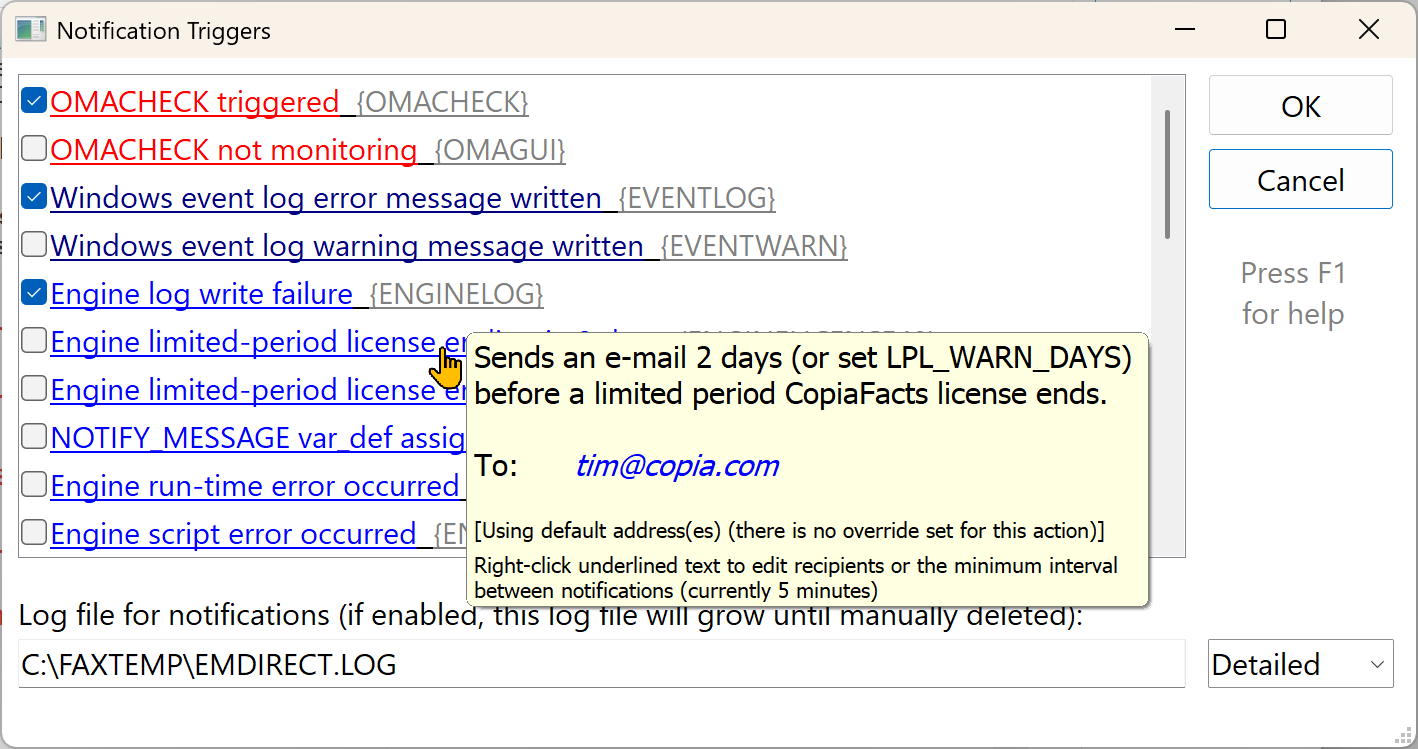
Part of the current list of triggers is as shown below; scroll down or enlarge the window to see them all. A full list appears below.
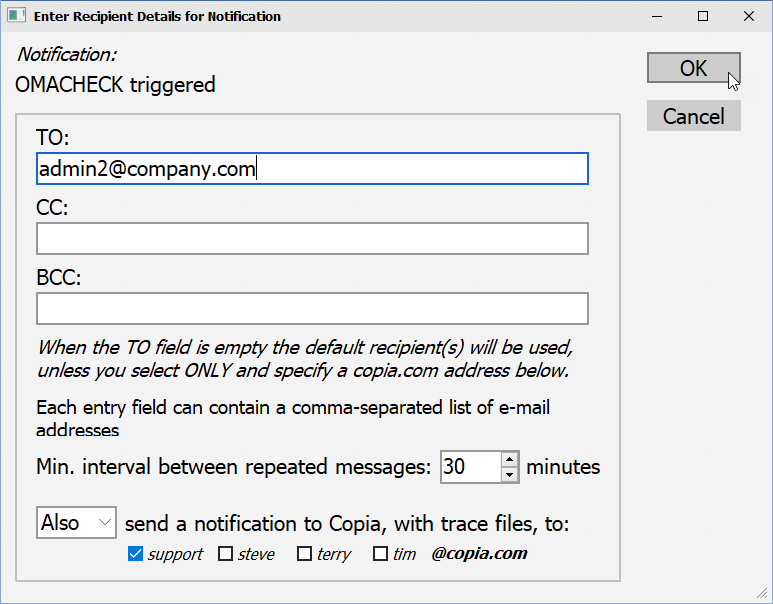
The pop-up help for each trigger shows the override recipient(s) for the corresponding messages, or the default notification recipient if there is no override. Right-click the trigger text description to display the edit dialog for the trigger properties and recipient list:
If you wish to send a copy of specific notifications to Copia support staff, please use the section at the foot of this dialog to specify the destination addresses. It is not necessary to duplicate these addresses in the cc or bcc entries, either in this dialog or in the default recipient destinations in the main EMSETUP window.
When appropriate, a copy of the applicable CopiaFacts trace file will be added as an attachment to the copy notification message sent to Copia to assist support staff in handling the notification.
 | For some triggers, it is important to set the interval between repeated sending of the same notification to a sensible value. The default interval is 5 minutes, which can result in an excessive number of messages in some cases. |
Automatic Triggers
The current automatic triggers are shown below. Check that some additions or changes may have occurred since the documentation was created.
| Trigger Code: | Trigger circumstances: |
| OMACHECK | whenever OMACHECK detects a stopped application or node. |
| OMAGUI | when the OMACHECK configuration window has been left open for 30 minutes, indicating that OMACHECK is not monitoring. Make sure that you close the configuration window after changing settings. |
| EVENTLOG | whenever an error message is written by CopiaFacts to the Windows Event Log. This trigger only occurs when CopiaFacts applications other than OMACHECK write to the Windows event log. |
| EVENTWARN | whenever a warning is written by CopiaFacts to the Windows Event Log. |
| ENGINELOG | on a COPIAFACTS engine log write failure. |
| ENGINELICENSE48 | notified 2 days before a limited period CopiaFacts license ends. You will need to install a new license key to continue running CopiaFacts applications. After this notification, the COPIAFACTS window title will also flash the warning (unless running as a service) and the notification will not be repeated unless COPIAFACTS is restarted. You may override the two-day interval by supplying a variable LPL_WARN_DAYS in the configuration file. |
| ENGINELICENSE | on shutdown of a COPIAFACTS engine at the end of a limited period license. |
| ENGINEVARSET | when a message is assigned to the variable NOTIFY_MESSAGE in a scripting infobox. |
| ENGINERTE | when an engine run-time error occurs during COPIAFACTS operation. You should normally configure this trigger to notify and send a trace file to Copia Support in these circumstances. |
| ENGINESCRIPT | when an engine script (IIF file) cannot be found for a PreProcess or PostProcess/PostReceive operation. If a script has been accidentally deleted or is otherwise inaccessible, it can cause multiple transactions to fail. |
| ENGINEOPTFS | when an engine error occurs during Enhanced FS processing. |
| ENGINECHANNEL | when a channel is taken out of service following a non-recoverable error. The notification will be triggered each time a channel is taken out of service, but whether COPIAFACTS shuts down is controlled by the CHANNEL_ERROR_MAX configuration variable. |
| ENGINERESTART | when a COPIAFACTS engine is restarted within 15 minutes since its last OMA file timestamp. |
| ENGINECACHE | when an internal error in the e-mail attachment cache causes caching to be disabled. |
| CONSOL | if multiple FS files have been pre-processed for consolidation but have not been sent after a failure in the consolidation. This type of error may not be immediately visible in job reporting. |
| JOBCREATE | whenever a Job instance creation (other than when done manually in JOBADMIN) has failed. |
| JOBLAUNCH | whenever a Job launch (other than a manual launch in JOBADMIN) has failed. |
| JOBPRECONV | whenever a Job pre-convert (other than when done manually in JOBADMIN) has failed. |
| FFMRGMV | when FFMERGE has created FS files to be sent but no engine OMA files are current. This implies that no COPIAFACTS instances are running to process the documents created in FFMERGE. |
| GWOMAFAIL | when the SMTP Gateway cannot write its OMA file to the FAXFACTS\LOG folder. The Gateway will have entered 'maintenance mode' where e-mails should be received and saved, but not processed. However incoming e-mail would not be received in the case of a network failure when saving is non-local. |
| GWRECOVER | when the SMTP Gateway recovers the ability write its OMA file. The Gateway will have exited maintenance mode. |
| GWFSFAIL | when the SMTP Gateway cannot write a worker/fax FS file. This usually implies a network failure. |
| GWSYSTEM | when the SMTP Gateway reports a system or message error while processing an incoming message. |
| GWSAVEFAIL | when the SMTP Gateway fails to save an incoming image or attachment. |
| GWLOADFAIL | when the SMTP Gateway fails to access the sender templates folder or to load an existing sender template. |
| GWMSGFAIL | when the SMTP Gateway SMTP or POP3 scanner fails save an incoming message. |
| GWPORTMON | when OMACHECK (running as a service or elevated) detects no process listening on a configured Gateway SMTP port. |
| CERTWARN | when an expiring/expired certificate has been used to secure, sign, encrypt, verify, or decrypt an e-mail. This notification is triggered for every such occurrence. |
| XCAPILIC | when an expiring/expired XCAPI Software Upgrade Service (SUS) has been detected. This notification will be sent on COPIAFACTS startup, beginning 28 days before the SUS end date, and will be repeated every day unless the trigger interval is set to more than one day. If not already configured, this warning will be automatically enabled after upgrading to CopiaFacts build 8.3.1.323 or later, with a seven-day interval. |
| PREPROCWARN | when FS files are found in the PREPROC folder with a timestamp older than a number of hours specified in the system variable PREPROC_HOURS (default 3 hours). This may imply that FFEXTERN is missing or not running. |