CFCP includes a display of the FS file counts in each of the principal folders under the CALLBACK folder. Click on the "FS counts" box on the left to view the counts:
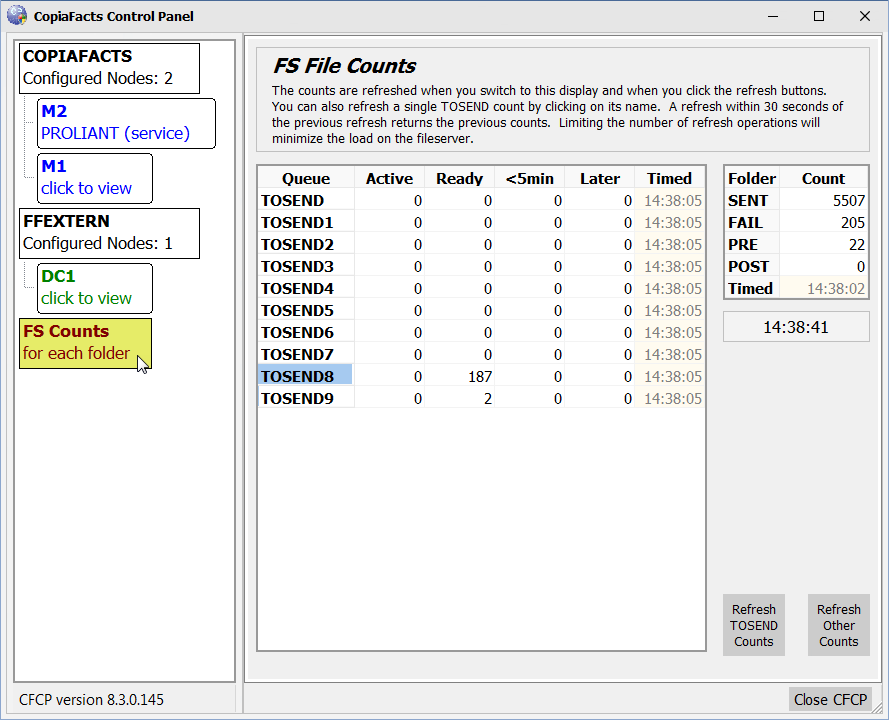
The counts can be refreshed manually by clicking the two large buttons at the bottom right, or you can refresh an individual count by clicking on its name.
The FS files are counted by the CFMSG service running on the machine where the files reside, so (unlike the counters in COPIAFACTS) there is no network load involved in counting the files. However repeated full refresh operations will cause some local load on the server. Because of this, the refresh of a folder count will be suppressed in the 30 seconds following the previous refresh, and the previous value will be shown.
