One-Shot Document Conversion
CVSINGLE [-options] inputfile outputfile [tempfolder|imageoptions]
The CVSINGLE program converts any of the supported documents to faxable TIF format. The use of this program avoids the need to create an FS file for processing by FFEXTERN. Because no user profile is available to the conversion process, option settings are made using the command-line options described below.
CVSINGLE will require the Copia Document Converter printer driver to be installed only if the conversion options specify Adobe (A), Print (for MS Office documents, P) or IE (I). The conversion will fail with return value -25 (outcome code 625)if the specified conversion method requires the print driver and it is not available.
The Document Converter printer driver is not available on all Operating System versions supported by CopiaFacts. See Printer Driver Support for a current list.
The output file extension should always be specified as .TIF except as described below.
This program must not be run on the same machine as FFEXTERN and must not be run in a way that could permit multiple instances to be active. For more information, see the description of Document Conversion features.
The command-line options are as follows:
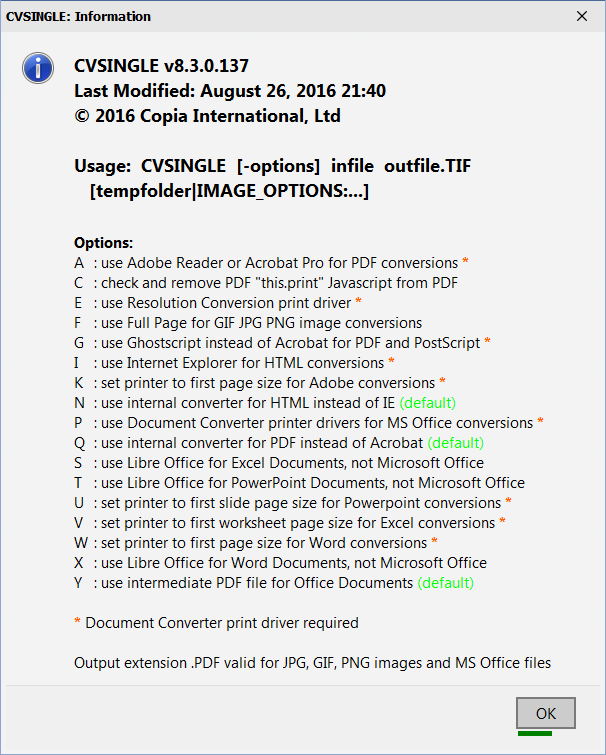
When multiple command-line switches are needed, they should be entered as a single string of letters preceded by a '-' sign. CVSINGLE options can also be set using $convert_options, or by placing a string of one or more of the above option letters in environment variable CVTOPTS.
Note that the applicable application must be installed on the machine running CVSINGLE. The tempfolder parameter specifies a temporary local folder into which the printer driver writes its output, before it is copied to the final output file. If not specified, the folder specified at installation as the local temp folder is used.
Instead of a temporary folder, you may also specify options for the built-in converters, using a string (in double-quotes) starting with IMAGE_OPTIONS: and followed by the option keywords. This string, if supplied, overrides other specifications by means of a IMAGE_OPTIONS variable, but is itself overridden by an IMAGE_OPTIONS alternate data stream in the original document file. These options are ignored for conversions done with the Document Converter print drivers.
If MS Office is used for the conversion or if you are using the built-in converters, the output filename may be specified as .PDF instead of .TIF. This will select the output format as .PDF.
CVSINGLE returns multiple counts of converted pages on successful conversion. A number such as 100020002 means that 1 .DOC file was produced from a WordMerge save; a 2-page PDF was converted; and a 2-page TIF was created.
Negative values of error levels (-1 to -99) returned by CVSINGLE are now subtracted from 600 to give an outcome code listed in the Error Outcome Codes topic.
Examples:
CVSINGLE "c:\My Documents\Report.doc" @FFBASE\temp\report.tif c:\temp
CVSINGLE -n sample.html sample.tif
CVSINGLE -q sample.pdf sample.tif "IMAGE_OPTIONS: edge brightness-10 dither7"
Trace Information When called from FFEXTERN running in Service mode, the CVSINGLE trace lines are written to the FFEXTERN_node.FTx file and controlled by the FFEXTERN trace settings.
