Generate DKIM keys and DNS records
DKDNS
This utility can be used to generate DKIM keys and associated DNS records for e-mail signing. It does not modify any DNS records; this must be done independently. The domain for which the DNS records will be added must be the domain of the message author, as in the From: header of the e-mail messages.
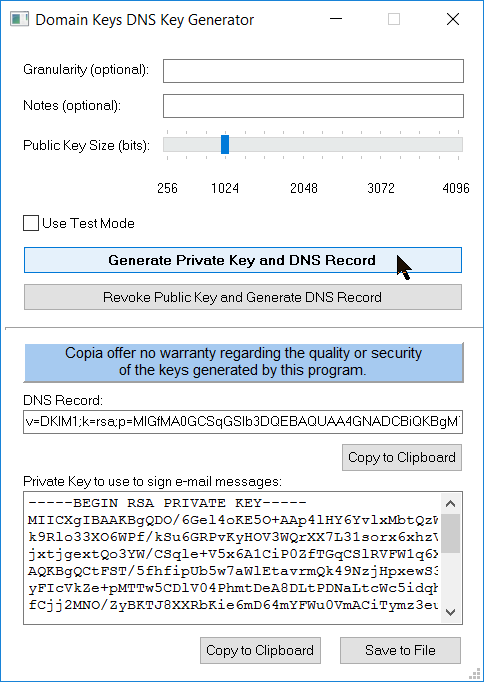
Each field in the dialog above has a hint which explains its function.
The keys are generated as specified for RSA keys, but Copia cannot guarantee the quality or security of keys generated by DKDNS. Other key generator utilities are available elsewhere, but we have found that in some cases you are supplied with a .PEM file containing both keys and additional text. The .PEM file can be edited in Notepad and should contain only the private key, with its header and footer text lines.
The DKIM standard recommends that the key size for DKIM should be at least 1024 bits. Here is why.
What to do with your DKDNS-generated private key
Save the private key in a .PEM file using the button in the dialog illustrated above. We suggest putting it in the FAXFACTS\Certificates folder. Then arrange for its pathname to be on an FS file command for all the FS files for which you plan to use DKIM signing:
$email_dkim_keyfile "`FFCERTS\DKIMRSAKey.pem"
You can place this command on an $fs_template command for Job Administration, or in an FFBC template file, or if you create your FS files by other means, add it to each one.
You also need to choose a 'selector' name or names for use with DKIM, which tells the DKIM verifier at the recipient domain where to look in your DNS records for the public key. You can set up multiple selectors for different types of broadcast. The selector name must also be specified in the FS file for each transmitted e-mail:
$var_def DK_SELECTOR copiadk
Other required and recommended variables and commands are shown in the examples for DKIM.
What to do with your DKDNS-generated public key
Each defined selector requires an entry in the DNS records for domain of the message author. Using the example copia.com, you define a subdomain (many ISPs refer to this as a Host) with a name made up of the selector followed by ._domainkey. So the full domain name is:
copiadk._domainkey.copia.com
For this host, you need a DNS record of type TXT containing the public key. How you do this depends on how you or your network admin or your ISP manages your DNS records. If you have an on-line editing facility there is normally a table you can add to, in which you typically need the following entries:
Host Type TTL Content
copiadk._domainkey TXT 7200 "v=DKIM1;k=rsa;p=MIICXgIBAA.....;s=*
After you have added this DNS record, it may take a few hours for it to become visible from recipient locations around the world.
To verify that this is all working, we strongly recommend that you send a test e-mail from your domain to one of the many DKIM verifier sites which you can find from Google. We have used https://www.appmaildev.com/en/dkim, who return not only a report showing success or failure of the DKIM signing, but also a useful report of how a long list of spam-blockers regard your sending address. Go the link and click the Next button to receive a test e-mail address, and then send an e-mail which enables DKIM from CopiaFacts to the test address. Please contact Copia support if you need help in interpreting the report.
