Convert VOX file to WAV format
CFUTIL VOX2WAV infile.vox outfile.wav
This utility converts VOX format voice files to WAV format. The input sample rate is retained in the output WAV file.
Because the VOX format has no header, the utility cannot automatically determine the input file format, so it uses the last format used by the FFPLAY utility as the format.
 | Run FFPLAY before running FFVOX2WAV and check that the file sounds correct when you play it. This will ensure that the file is converted correctly. |
The WAV file is set to 8-bit or 16-bit samples depending on whether the output setting in FFPLAY is set to 8-bit or 16-bit. If the VOX file is in a-law or μ-law format, this encoding is removed and the output is always linear.
When converting VOX files with a sample rate of 6000 samples/second for use in VoIP applications, note that they also need to be re-sampled to 8000 samples/second. Appendix K offers some suggestions for how to do this.
Also see Appendix K for details of the WAV formats you can use with the supported hardware boards and ports.
Example:
To convert ADPCM VOX of 6000 samples/second to linear 16-bit 8k WAV, first run FFPLAY and select the correct VOX rate and format:
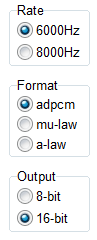
Verify that the file plays correctly by playing part of it in FFPLAY. Then run this program to convert to WAV:
CFUTIL FFVOX2WAV message.vox message.wav
If you need to re-sample the file also, follow the examples in Appendix K.
