In the following lists, the rate value (e.g. 'at 6000') denotes samples per second. Consult the manufacturer's documentation for complete details of which formats are supported by your hardware and firmware.
Note that μ-Law encoding is normally used in the USA and Japan. A-Law encoding is normally used elsewhere in the world. If this incorrectly specified, attempts to play or record may fail or cause distortion.
If your system has more than one type of voice-board in a single node, you must select the same formats for all boards. CopiaFacts does not support operation with a format which cannot be handled by all the voice boards in a node.
 | See Converting Voice Formats at the end of this topic for hints about converting files between different formats. |
CopiaFacts original default voice format was ADPCM 4-bit encoding with 6000 samples per second. Now .WAV is the standard format, and ADPCM can no longer be used in the board/port environments currently supported (other than Diva). You must use the $voice_format configuration command to select which WAV format to use for standard voice prompts. The format for an individual recording can also be overridden using the RECORDING_FORMAT system variable in an infobox sequence.
Brooktrout formats
CopiaFacts supported the following constants to specify the voice format that is used for non-WAV (headerless) voice files:
| ADPCM | ADPCM (4-bit) at 6000 |
| ADPCM8 | ADPCM (4-bit) at 8000 |
| PCM | A-Law PCM (8-bit) at 6000 |
| PCM8 | A-Law PCM (8-bit) at 8000 |
| MULAW | µ-Law PCM (8-bit) at 6000 |
| MULAW8 | µ-Law PCM (8-bit) at 8000 |
CopiaFacts supports the following WAV formats on Brooktrout SR140 ports:
| WAVALAW8 | A-Law PCM (8-bit) at 8000 |
| WAVALAW11 | A-Law PCM (8-bit) at 11000 |
| WAVMULAW8 | µ-Law PCM (8-bit) at 8000 |
| WAVMULAW11 | µ-Law PCM (8-bit) at 11000 |
Diva and XCAPI formats
CopiaFacts supports the following constants to specify the voice format that is used for non-WAV (headerless) voice files:
| ADPCM | ADPCM (4-bit) at 6000 (Diva only) |
| ADPCM8 | ADPCM (4-bit) at 8000 (Diva only) |
| ALAW8 | A-Law PCM (8-bit) at 8000 |
| MULAW8 | µ-Law PCM (8-bit) at 8000 |
| PCM8 | Linear PCM (8-bit) at 8000 |
| PCM16 | Linear PCM (16-bit) at 8000 |
In addition, CopiaFacts supports the following WAV formats for Diva and XCAPI boards/ports:
| WAVALAW8 | A-Law PCM (8-bit) at 8000 |
| WAVMULAW8 | µ-Law PCM (8-bit) at 8000 |
| WAVPCM8 | Linear PCM (8-bit) at 8000 |
| WAV16PCM8 | Linear PCM (16-bit) at 8000 |
CopiaFacts supports the following constants to specify that .WAV files are to be created, provided that the format is supported by the hardware and firmware in use (see above):
| WAVADPCM6 | ADPCM (4-bit) at 6000 |
| WAVADPCM8 | ADPCM (4-bit) at 8000 |
| WAVMULAW6 | µ-Law PCM (8-bit) at 6000 |
| WAVMULAW8 | µ-Law PCM (8-bit) at 8000 |
| WAVMULAW11 | µ-Law PCM (8-bit) at 11025 |
| WAVALAW6 | A-Law PCM (8-bit) at 6000 |
| WAVALAW8 | A-Law PCM (8-bit) at 8000 |
| WAVALAW11 | A-Law PCM (8-bit) at 11025 |
| WAVPCM6 | Linear PCM (8-bit) at 6000 |
| WAVPCM8 | Linear PCM (8-bit) at 8000 |
| WAVPCM11 | Linear PCM (8-bit) at 11025 |
| WAV16PCM8 | Linear PCM (16-bit) at 8000 |
Note that stereophonic WAV files are not currently supported by any of the voice boards.
Copia VoIP Ports formats
Copia VoIP ports support natively only the WAV16PCM8 voice format. Most other monaural (single-channel) WAV formats are converted to this format on the fly, but quality may suffer if the data has to be resampled (to change the sample frequency to 8000) and if you are playing a 20-minute message, converting it may cause a noticeable momentary delay.
| Whenever possible, record messages in the native format. Avoid re-sampling to retain maximum quality. |
If you already have ADPCM VOX files (a Dialogic telephony format) and these are not supported by the WAV file editor or converter you are using, you can use a utility such as SOX (free), or a suitable audio file tool, to convert them to a WAV format, but they will usually also need to be resampled: see below.
The $voice_format configuration command and the RECORDING_FORMAT system variable are ignored for recording on Copia VoIP Ports, and files are saved only in the native format.
When converting from VOX to WAV, note that the resulting converted files will sound the same as the original 4-bit ADPCM samples, that is, not very high quality. And most VOX files have a 6000 sample rate and will need to be resampled to 8000 samples/second for use in VoIP. This may further reduce the quality.
If you need to resample an existing WAV file, or change its properties, there are several utilities available which will do this. We recommend the free SOX utility, which is a simple command-line program which can very easily convert from one WAV format to another. Because the WAV format includes a descriptive header, when converting from an input WAV format you only need to specify the wanted output rate and format to perform a conversion.
SOX is available from http://sox.sourceforge.net. Just following the examples below should allow you to convert files to meet CopiaFacts' requirements, but of course SOX will do much more than just change formats if you need to change pitch, speed or many other attributes of the message. The download for SOX includes full documentation.
Examples:
Convert ADPCM VOX of 6000 samples/second to linear 16-bit 8k WAV for VoIP.
First run FFPLAY and select the correct VOX rate and format:
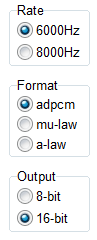
Verify that the file plays correctly by playing part of it in FFPLAY. Then run this program to convert to WAV:
FFVOX2WAV message.vox message.wav
Then to resample the file to 8000 samples/second, for example for a Copia VoIP port application, run the following SOX command:
SOX message.wav --rate 8000 message8.wav
Convert ADPCM VOX of 6000 samples/second to linear 16-bit 8k WAV for VoIP.
As an alternative, you can use SOX for the whole conversion, since it recognizes VOX format. But you still have to give it the sample rate, and in this case also the output format:
sox -r 6000 -e oki-adpcm message.vox -e signed-integer -b 16 -r 8000 message88.wav
Convert any WAV file to linear 16-bit 8k WAV for VoIP.
sox infile.wav -e signed-integer -b 16 -r 8000 outfile.wav
Text-to-Speech
CopiaFacts also provides XML files to create Standard Voice Prompts using Text-to-Speech. The TTS settings are used to create WAV files in the appropriate format for the environment in use.
