The SMTP Gateway can maintain its own folders of saved and rejected messages by deleting or archiving the files. It includes a subset of the features of the CFHK housekeeping service. Because these files are usually in a local folder, using the feature built in to the Gateway is recommended instead of CFHK, which normally runs on the same machine as the COPIA share.
If you operate a secure gateway, or need to be fully HIPAA compliant, you should consider not checking the checkboxes on the Service tab which cause these files to be saved, in which case you will not need to configure the Gateway Housekeeping feature.
Deleting and archiving files is configured on the Housekeeping (rightmost) tab of GWMANAGER.
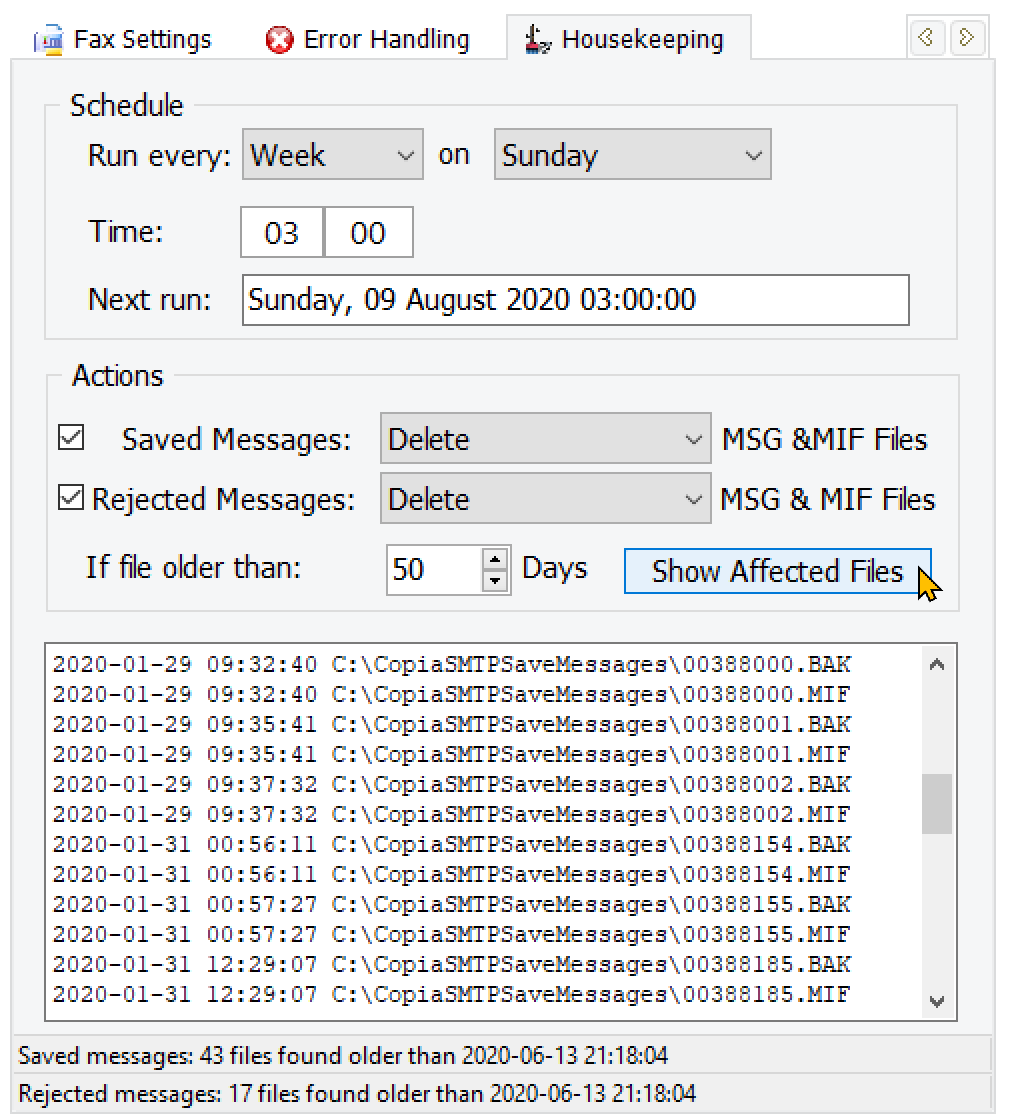
If you select Move to ZIP Archive in the Action section, instead of deletion, the ZIP file will be saved in a SAVED subfolder of the corresponding scanned folder, which will be created automatically if not already present.
It is recommended that you select a time outside normal working hours. The Gateway scan for incoming saved messages will be paused while the scan for deletion and archiving is done. The Gateway will continue to receive incoming messages during the operation.
You can verify the files which would be processed if the operation was performed immediately, by clicking the Show Affected Files button. The display will show only the first 1000 files found in each folder which would be processed. If you know that there are a huge number of older files present it is best to delete them manually, not during the first use of this feature.
If the Gateway service is not running at time of a scheduled deletion or archiving operation, the next action date and time will be reset the next time the service starts.
