Sender Template Validation
The sender templates validation option (on the Validation tab) allows the use of FS file templates to both validate senders and to provide additional fax customization or alternative processing of the email message based upon sender and domain. When this option is selected, the gateway checks for the presence of a folder corresponding to the sender's domain (following @) and a template file corresponding to the sender's mailbox (preceding @). The domain folder must be located in the folder specified in the Sender and Recipients Templates section at the bottom of the validation section tab. The template file has extension (.FST) and may contain any valid FS (fax send) file commands. Validation proceeds as follows:
| No domain | If the domain folder is not found, the email is rejected and the sender receives an SMTP 500 error message. |
| No sender | If the domain folder is present, then the gateway searches it for the presence of a template file for the sender. If no template file is found for this sender, the gateway checks the domain folder for a file named DEFAULT.FST, which is the default sender template for the domain. This template is optional and allows email to be received from any senders from the specified domain. The default template will then be used to provide additional FS file commands for these senders. |
| No domain default | If there is no default sender template and no matching sender template, the email will be rejected with an SMTP 500 error message. |
Sender Templates without Validation
You may also use sender templates without selecting Sender Template Validation (shown as 'Pass Through'). The gateway will always use a sender template to provide additional customization capabilities for individual senders if a matching or default sender template is found. You may also specify a global default sender template to be used when no matching sender template or default template for the sender domain is found. Generally you would not use a default global sender template unless you wished to perform custom processing for email sent to the gateway that could not be validated against existing senders. You could provide a custom script for unrecognized senders that forwards email from these senders to an administrator for evaluation and further action. You also have the ability to restrict individual senders from using the gateway to send fax messages.
 | Note that a $worker_box command in a Sender Template will completely disable the normal email-to-fax operations of the CopiaFacts gateway for affected senders. Your worker-box script must handle the incoming e-mail. |
The global default sender template is named SENDER.FST and should be located in a folder named DEFAULT located in the Sender template folder along with the other sender domain folders. You should be extremely cautious about providing such capability when your gateway is open to the Internet, to avoid collecting spam. We recommend using the option flags to restrict fax operations for the global default sender or using the worker box option to completely control the processing of email messages allowed under the global default sender.
Sender Template Maintenance
Sender templates should normally be maintained within GWMANAGER (see Working with Templates) but can also be edited separately using COPIAEDIT. Both these editors offer syntax highlighting and integrated command help. Avoid Windows utilities such as Notepad or Wordpad, especially if you have set Unicode or UTF8 encoding for FS and FST files. The templates are plain text files containing valid FS file commands.
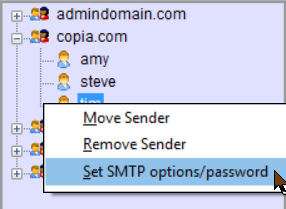
If you use an SMTP_OPTIONS variable definition in the Sender Template, it is normally best to maintain it using the SMTP Template Options dialog, accessed from the right-click menu in the list of senders:
The Sender Template DLL
To avoid the need to maintain a large number of sender templates, larger users may prefer to write a DLL to give full dynamic control over the template without the need for separate files. This DLL can use whatever sources or databases are convenient to validate senders. The DLL path name must be supplied as the value of a FAXFACTS.CFG variable TEMPLATE_DLL_PATH, and you may also specify, as TEMPLATE_DLL_BUFFER_SIZE (default 2048 Unicode characters), the maximum size of the template text you will return from the DLL.
Your DLL will be passed the recipient domain, the sender From: address, and the sender IP. It can return -1 to reject the message, 1 to accept the message and use the passed template text instead of looking for a sender template file, or zero to accept the message if it there is a normal sender template for it.
When you return 1 from the DLL, you must also fill the passed buffer with the text (commands and parameters) which would have been in the individual Sender Template FST file if you were not using the Template DLL.
Custom Template DLL Specification
The next topic describes the use of Recipient Templates.
