From release 8.3.1.299, CopiaFacts provides a method of creating a fax cover sheet from the HTML content of an e-mail, or any other simple block of HTML text containing a cover sheet memo. This was intended mainly for use in email-to-fax applications, where a user wishes to send e-mails with a 'cover memo' in the text/html body of an e-mail, but can be used for any application which needs a standard cover sheet with a custom text block supplied as HTML.
In order to enable the processing of an incoming e-mail HTML body as a cover sheet, you must enable '"send HTML/RTF e-mail as fax page(s)" in the sender template options dialog.
To configure HTML cover sheets. Copia provides a sample block of HTML code for a 'header' and 'footer' for a fax cover. These blocks may contain variables to insert such items as sender name/address, date, time, recipient name, subject, etc. You may modify this HTML code or substitute you own text. These HTML blocks should contain no standard HTML heading tags, because they will be inserted into the incoming message text, the header immediately following the <body> tag and the footer immediately preceding the </body>. If the email body text has no <body> </body> tags (as happens in some e-mail systems), then the header and footer files are inserted before and after the entire body text.
The sample header consists of:
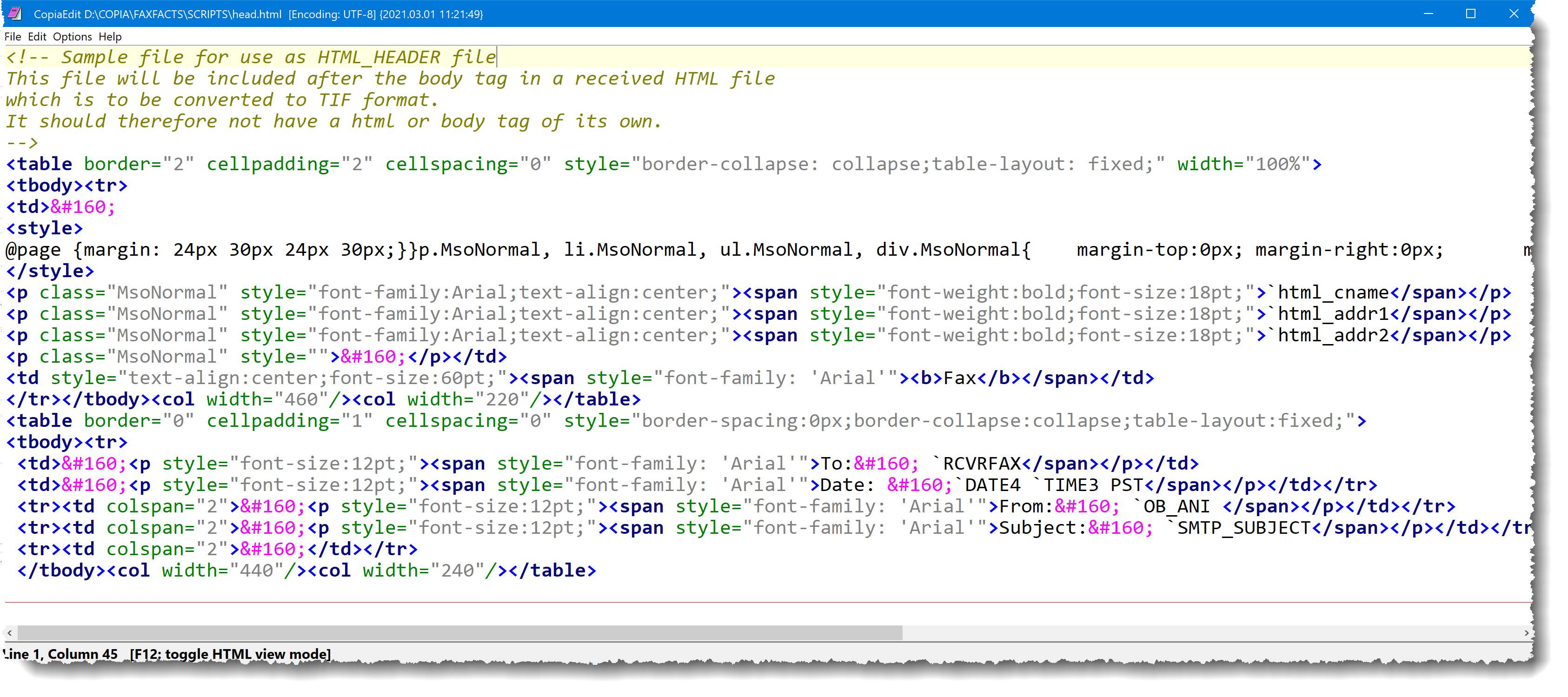
and is displayed (before margins and variable expansion are done) as:
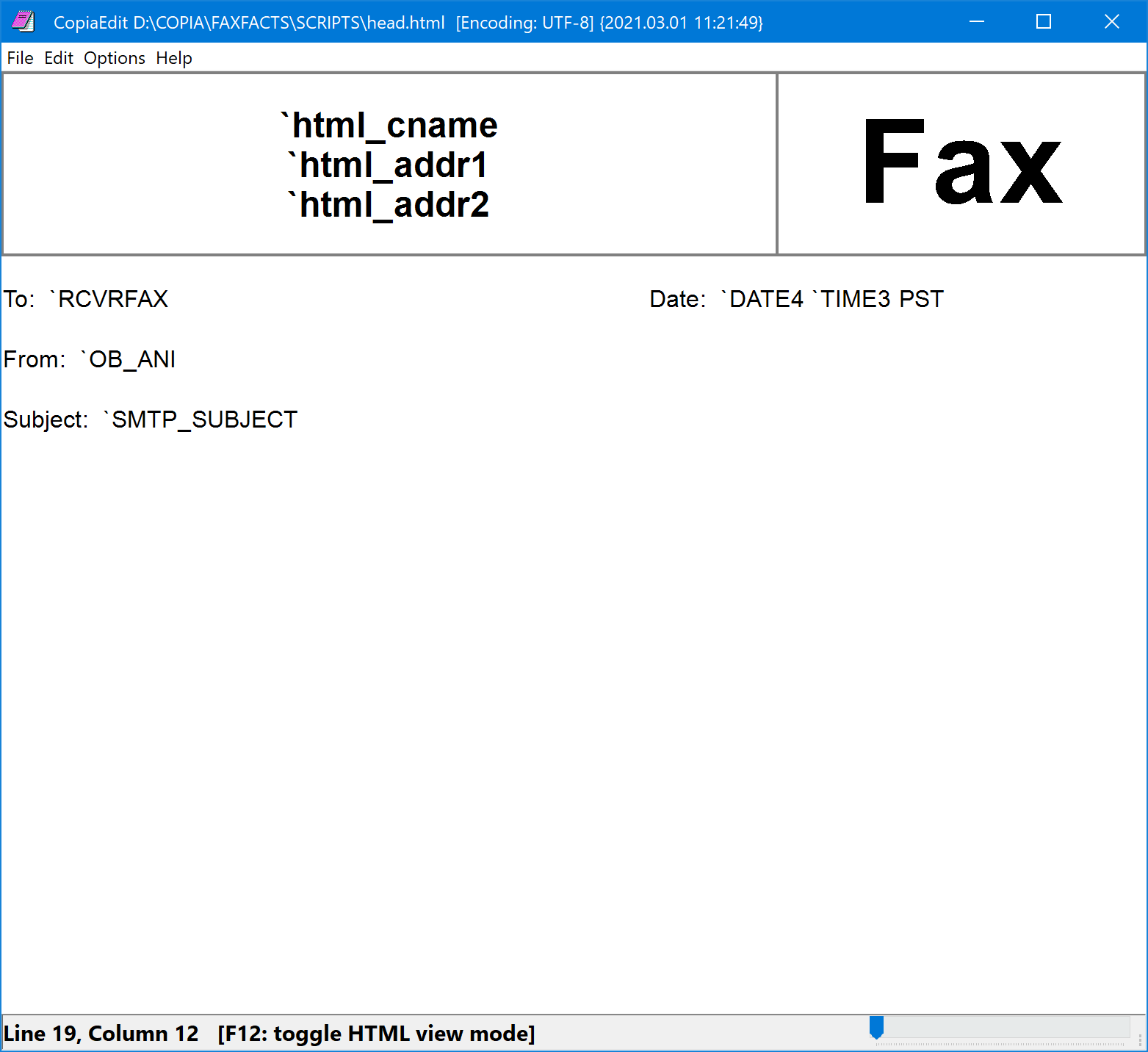
You can use COPIAEDIT to edit the sample HTM: files; this has an F12 option to display the rendered HTML as shown above. If you use another HTML editor, make sure that it allows a raw 'include' file to be created, without automatically surrounding it with <html> ... </html> and other usually-required tags.
 | If you make changes to the HTML it is essential to test, with a variety of e-mails with different types and amounts of text, that the resulting converted TIF files look as you expect. |
You can also use COPIAHTML to create or edit the HTML header and footer in WYSIWYG mode. However to work with the raw HTML you would then need to open the COPIAHTML output in COPIAEDIT to allow you to toggle between the two views of the content.
Required Variables
Variables must be defined in the Sender Template(s) to use this type of cover sheet with the CopiaFacts SMTP Gateway. For other applications the variables can be defined anywhere in scope at fax transmit time (CFG, USR, FS).
Examples for the provided sample header are:
$var_def HTML_HEADER "@FFBASE\SCRIPTS\head.html"
$var_def HTML_FOOTER "@FFBASE\SCRIPTS\foot.html"
$var_def EXPAND_BI_HTML yes
If HTML_HEADER or HTML_FOOTER variable is empty or absent, the insertion of the file is omitted.
In addition the sample header includes user variables to set a company name and address, which should also be defined in the same way, along with any others you add to the sample files:
$var_def HTML_CNAME "My Company Name"
$var_def HTML_ADDR1 "Address line 1"
$var_def HTML_ADDR2 "Address line 2"
Other existing variables are used in the sample header: RCVRFAX, OB_ANI, SMTP_SUBJECT, DATE4, TIME3. The sample footer uses no variables.
Required Conversion Option Setting
In FFEXTERN, in the Document Convert Options dialog, you must select 'At Send Time' for HTML conversions. This will ensure that all the variables in use can be processed for conversions to TIF. Currently the Document Converter cannot insert these HTML headers and footers when converting HTML to TIF, either with the built-in converter or when using Internet Explorer and print drivers; they are only processed at send time.
