
Copia is currently one of the largest providers of private and commercial broadcast fax software. There are large service bureaus that are larger, but they run internally developed software. Copia provides fax software solutions for customers needing 2 to 99,999 phone lines.
This guide covers the design issues involved in selecting and running a fax broadcast system. After reading it, you should better understand the problems involved and how Copia chose to solve them.
Why Fax Broadcasting?
When the internet became the big new thing in 1995-96, people were saying that "fax is dead." The people who saw the power of the internet were sure it would kill off all fax use. Instead, because of the rise of spam — sending email to people you don't know and trying to sell them your stuff — fax has kept growing at around 20% a year. Here's why I think the internet hasn't been able to kill off faxing.
First, to paraphrase a line from Sara Lee, "nobody doesn't like fax." People who use fax every day, like it. It's easy, quick, and most people have a good experience with their first use of a fax machine. That's not always the case with computers.
The second reason the internet hasn't killed fax is that email is too familiar and personal. When you receive email, you don't get a logo or any graphical information. You don't mind email from friends and co-workers, but most people are put off by email from strangers — and when a stranger emails you trying to sell something, that's spam. Even though you haven't wasted paper printing it, you still spend time waiting for it to download, reading it, and deleting it. The time it takes to decide a fax is "junk" is less than the time spent trashing an unwanted email.
When you talk to sales and marketing people about using the internet instead of fax, they're not happy with that trade-off. With email you don't get any graphics. With fax you get a full 8½-by-11-inch page — much like a full-page ad in a magazine. Sales and marketing teams like a full page more than a screen's worth of plain text delivered by email.
The best and final argument for fax over email is that it gets results. Copia once sent a short, single email to a list we'd collected at a trade show. That single email broadcast brought us no leads, and a number of quite upset recipients who were unhappy about receiving a single unwanted email, and said they'd rather buy an inferior product than do business with a company that uses spam.
As someone who wants to sell a product and have happy customers, that kind of reaction to a marketing plan is not welcome. On the other hand, people who have tried a fax broadcast tell us the results were amazing — response rates were much better than expected, and the number of actual sales, not just leads, was well beyond expectations.
Copia Does Fax Broadcasting Better Than Anyone Else
To say we do fax broadcasting better than anyone else is a large boast. Let me cover how Copia has been inventive in solving the faxing problems you can think of now, and the many other problems you haven't thought of yet. The Copia FaxFacts product is about "no limits" faxing.
Copia's History in Fax
Copia was the first company to provide a Fax-on-Demand system as a software product. Copia released FaxFacts in November 1989 at COMDEX in Las Vegas, NV. Copia FaxFacts systems have been in continuous operation since 1990.
Copia was the inventor of the same-call Fax-on-Demand system, and was granted a US patent for the invention. In 1990, fax and voice boards handled only a single line each, so we had to develop a system that could share the load across multiple CPUs.
That early design decision — sharing the fax load — has paid off for our fax broadcast systems ever since, allowing very large systems to be installed.
Some of the questions you need to ask yourself when planning your broadcast system are:
Is it scalable?
Can additional CPUs be added to deliver faxes, and can additional CPUs be added to help with the rasterization process, for features such as mail merge?
As we continued working on the Fax-on-Demand system, we decided to hand off "fax-back" requests into a general queue, processed by all the CPUs acting as fax servers. The queue isn't a file, but a directory we call TOSEND. One of the most important design goals of the FaxFacts system was to be an "open" system. When your queue is a single file with records in it, you have to provide an API for outside programs to send faxes — and each programming language needs its own API.
Copia reviewed the work GammaLink had done on their Gammafax product line. Copia supports the entire Dialogic/Gammafax product line, along with Brooktrout and others. Terry Flanagan decided early on to store the information needed to send a fax in a normal ASCII file. Using a file to store what would normally go into a "queue record" has real advantages, and some tradeoffs. With an ASCII file per queue request, we have the ability to write a request to send a fax from any programming language. The essence of the FaxFacts API is the following information written into a file:
$fax_phone    630-778-8848
$fax_filename mytiff.tif
That file is written to the TOSEND folder under a unique file name. The FaxFacts engine controls the broadcast process on each CPU that has fax boards installed. It looks for unclaimed files in the TOSEND folder; when it finds one, it sends the named file to the specified phone number. Once the fax is sent, the file is moved out of TOSEND into either the SENT or FAIL folder — which has the advantage of TOSEND being constantly emptied by the engine. The file also stores additional information, such as the failure code or the CSID of the receiving fax machine, and that information can grow without the field-size limits a queue record would impose.
The design of a file-based queue also removes the need to pack, compress, or run maintenance programs on the faxing system.
The system duty cycle should be 24/7
The system shouldn't have files that grow and then need cleanup, garbage collection, or compaction programs run against them. Some systems can't run for days, weeks, or years without someone adjusting something. Copia designed FaxFacts to run for years without operator intervention.
Why three kinds of fax broadcasting?
With FaxFacts, a broadcast can happen one of three ways. Sending the same image to a list of people is a fax blast, or simple fax broadcast. To increase reader attention, you can run a graphical cover-sheet broadcast, placing database fields anywhere on an image template — we call this a watermark — so the fax carries the basic message plus variable information overlaid onto it. Each field's position, size, font and angle can be set up visually. For even more power, you can mail merge to fax using the FaxFacts FFMERGE system, which is unique to Copia in how it's built — more on that below.
Fax blasting
FaxFacts is a great fax blaster for someone with just two phone lines, and scales much further than most systems when it comes to larger volumes. FaxFacts is a "no limits" faxing system — whether you want to blast fax to 1,000, 10,000, or virtually unlimited recipients.
When blasting, is there only one copy of the fax?
Many systems need a separate image for every recipient, which forces the system to create, move or use more disk space per receiver. With FaxFacts, each receiver gets a small file that just names the fax image to send, which saves time and disk space. Using the FaxFacts fax blaster, we can launch 100-150 faxes per second.
That means you can launch 9,000 fax-blasting requests per minute — which doesn't mean you're sending 9,000 faxes per minute, only that you've queued 9,000 requests. Launch speed only becomes a bottleneck if you can't launch faxes as fast as you can send them. How many lines would you need to keep up with 9,000 faxes a minute? At roughly 45-60 fax pages per line per hour, you'd need about 9,000 phone lines to keep pace with the launcher. With "no limits" faxing, the file system doesn't limit how many faxes can be launched — the only real limit is when the file server runs out of disk space.
Graphical Cover-Sheet Broadcast
The next type of broadcast fax is what we call a graphical cover-sheet broadcast, designed to increase the readership of direct mail sent by fax. Some call this "junk fax" — but it's only junk if you're not interested in the information.
People will read a fax that has their name on it. Most of you have seen a direct mailing with your name worked into the sales pitch — the same effect can be done with a graphical cover-sheet blast fax. We've had good luck placing the recipient's name at a slight angle in a script font, as if a friend had scrawled a note and faxed it over. The chance of someone reading the fax goes up considerably when their name is written on it.
There's a story behind how the graphical cover-sheet product came to life. In the Fax-on-Demand market, one competitor could construct a fax from data and images, but it required programmer-level coding and wasn't visual. We needed to meet that bar, and we also wanted to improve on the look of the cover sheets other systems produced.
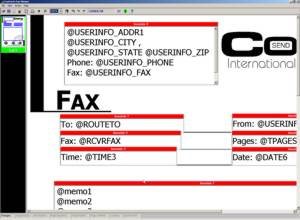
The original cover sheets available in most faxing systems had a logo followed by whatever ugly ASCII font the fax board supplier provided — no compression or any of the formatting options Windows users had come to expect. The graphical cover-sheet program ran before the fax was sent, overlaying date, time, sender and memo information onto a watermark logo sheet.
The graphical cover-sheet monitor ran on the server and produced a temporary work file combining the watermark and the variable information into a finished cover sheet. Once that was working, customers asked whether we could run a blast fax using the graphical cover sheet to increase readership — and we were well into "direct mail via fax."
We've since added many formatting features to the graphical cover-sheet system. Some customers actually use it as a forms-processing system, since any field can be positioned on the watermark image to within 1/200th of an inch — useful for faxing back completed forms, invoices, and routing to the nearest fax machine by email.
Mail Merge to Fax
Copia's real strength in fax blasting is FFMERGE. This is the single strongest reason to choose Copia's fax system over everything else in the market — let me explain why.
During a trade show in London, Tim Frost and I were driving back from London to Tim's home near Stonehenge, working through customer problems with faxes. We'd been asked whether we could do mail merge to fax. At the time, we couldn't.
The trouble with mail merge to fax is figuring out where the word processor's print stream stops for one fax and starts for the next, and how to pass along the fax number and other information. Other solutions we knew of used DDE (Dynamic Data Exchange), vendor-specific API calls, or embedded keywords. Neither of us wanted to write Word Basic macros to interface with the fax system, and we didn't think a system that scanned the print stream for keywords would be reliable. We wanted something easy to use, that worked with any word processor on the market, without having to buy and test every one that had ever shipped.
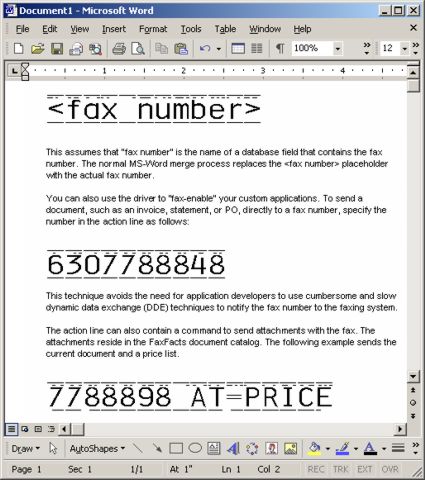
As we talked it through, we landed on the idea of doing the equivalent of OCR on the fax number. We both knew OCR was a lot of work and would slow the system down, so instead of reading the font on the way into the Windows conversion to graphical raster lines, we decided to look at the raster lines as they came out of rasterization.
We designed a special TrueType font with a line above and below each character. Just under the top bar, we encoded a binary signal that decodes into the actual character. A 12-point font is the same as 10 characters per inch, and at 200 pixels per inch for fax images, that gives exactly 20 pixels — or dots — across each character. We made the overbar 18 dots wide across the top and bottom of each character, letting us "see" our font as soon as the page starts.
Once we "see" the font, we can read the next scan line and decode it directly — we call this the firing line, and it carries the fax number and anything else we want to pass from the printing system to the faxing system. Because we only need to check the top of the page to find the firing line, the rest of the printing process runs at full speed. FFMERGE prints a ready-to-fax TIFF image at 30-60 pages per minute (slower than the 100-150 pages per second mentioned earlier, since this is the print-and-convert step, not the send step).
Let's see how well FFMERGE holds up against our own design goals:
Is it easy?
Yes. Get your mail merge running to paper, then place the fax phone number field at the top of your form letter, set its font to the FFMERGE font we supply, and set the size to 12 point. That's the entire setup.
Do you have to program?
No. Because we read the print stream as a print driver, we don't know or care which Windows application produced it. We don't have to purchase and test every word processor on the market, and customers don't need a macro package for each new OS or word-processor version.
What databases do you support?
Because we pull our information from the printed image itself, we support any database your word processor supports. If you can print it, you can fax it.
Do you support the latest version of Word?
Yes — if the system prints to Windows and you can control font selection, you can use FFMERGE. (Copia was issued patent number 5,715,069 on February 3, 1998, for the FFMERGE product.)
"Sure, we can do mail merge" — not always
We've heard from a number of people who bought a product that claimed to do mail merge, only to run into trouble whenever an application like MS Word was upgraded. Some implementations also slow down as the mail merge grows — quick per page at first, but unable to keep up with outbound lines after a thousand records. If a vendor says they support mail merge, ask whether it works with your current tools and OS, and what the practical limits are on job size.
Once you're used to how easy FFMERGE is, you'll find it's free of pop-ups and much faster than the alternatives.
FFMERGE, taken further
Once you understand how the FFMERGE print driver works with its TrueType font, consider everything else you print. Why mail something you can fax? With FFMERGE, an invoice, statement or purchase order can be printed directly to the recipient's fax machine.
Printing a piece of paper, folding it, addressing an envelope, adding postage and leaving it in the hands of the postal service makes little sense by comparison. Using FaxFacts for what would normally be mailed gives you access to the receiver's fax printer around the clock, versus the days it typically takes ordinary mail to move between two points.
We work with customers who've pulled in their payment times and lowered delivery costs by faxing instead of mailing paper to other businesses.
Helpful Tips and Hints
How many phone lines will I need?
As a rule of thumb, plan on about 45 pages per phone line per hour for a one-page fax in normal mode. Even though a single fax may take a minute or less, busy signals, dial and ring time add up, so 45 pages an hour per line is closer to reality. Multi-page faxes push that number toward 60 pages per hour per line; higher-resolution faxes bring it down toward 30.
How much disk space will I need?
More is always better. Graphical cover-sheet and mail-merge jobs create two files per recipient — a TIFF file of 30,000-100,000 bytes and a control file of about 300 bytes. On a FAT file system, even small files consume a full allocation block, so you'll use more disk space than the raw byte counts suggest.
On the original MS-DOS FAT file system, even a 300-byte file can take up 32,000 bytes of allocation. Writing 1,000 such files can consume 1,000 times 32,767 bytes of disk space, even though the directory listing shows only 300-byte files. Novell systems use a 4,096-byte allocation block if the file system isn't compressed — not a FaxFacts issue specifically, just a consideration with many small files. We think the benefits of load sharing and speed outweigh the wasted space from file allocation. NTFS, with a typical allocation size of 512 bytes, is one of the best file systems for FaxFacts, since 512 bytes is close to the actual size of our control files.
Should I use a service bureau?
Service bureaus are a great option if you need to send a lot of faxes, and Copia values its service bureau customers. Working with large bureaus has helped us remove bottlenecks we hit around the 100- and 400-line system sizes — we currently have systems with more than 600 lines operating as a single blast-faxing system. A bureau's advantage over an in-house system is bandwidth: if 5,000 recipients all need a fax within the hour, a bureau can deliver that. A bureau also takes on the work of keeping the system running and dealing with the phone company.
What you don't get from a bureau is the increase in your own telephone volume, or the ability to lower your overall phone costs for fax and voice traffic. If you want fax broadcasts to run at night on phone lines that would otherwise sit idle, you need an in-house system — which then doubles as your LAN fax server, letting other users on the network send faxes too. Running in-house also lets you move the launching of fax blasts directly to the people sending them; most service bureaus can't do a true mail merge to fax, which is much easier to handle in-house.
Smart Retries
Working with different fax boards and customers over the years, we learned how to get faxes through when possible, without endlessly retrying numbers that will never work. We started by specifying a number of retries and a delay between attempts, which is what many systems offer. The first problem we saw that this didn't address was self-induced busy signals.
Does the system detect and prevent its own busy signals?
A self-induced busy happens when more than one entry in a broadcast list shares the same phone number, so more than one phone line tries to send to it at once. Other systems we looked at could only respond by increasing the retry count. What we did instead was prevent the problem in the first place: as each phone line selects a file to send, it first checks whether the number is already in use by another line. If so, the file is skipped and the retry count isn't incremented.
Can the system recover in the middle of a fax?
Beyond fixing the busy-signal problem, we improved retry handling with what we call Smart Retries. This gives you enhanced control over retrying failed outbound faxes — you can specify that only the unsent pages are retried if a transmission fails partway through a multi-document job, and set different retry patterns for different failure classes.
A special cover sheet can also be used for retry attempts. The whole system is table-driven, so you can change how FaxFacts responds to every failure status the fax board reports — retry specific error codes, or fail them after a single attempt. One common use: retry a busy or ring-no-answer fax after an 8- or 12-hour delay, so faxes still reach machines that were out of paper or turned off overnight.
Is the system automated?
Copia FaxFacts has always been built around letting the system "run itself." Windows' visual, graphical interface is great for working with fax images with a mouse — but a mouse still needs a human hand. Alongside the visual tools for launching and managing fax broadcasts, FaxFacts also has automation versions of those same tools.
The automation tools let fax broadcasts be launched from IVR, email, an inbound fax, or a scheduled time of day. Many of our service bureau customers have fully automated the launching of customer broadcasts: the customer uploads a list and image by fax, BBS, or email/web, receives a proof fax, and can call an IVR port to approve or kill the job if the proof isn't right. The system also accepts IVR input before a fax is even received, specifying the list, priority and send time, and the customer can call in for job status by voice playback or a faxed status sheet.
Do Not Send (DNS) block lists
Any broadcast system needs a central way to block fax numbers. FaxFacts keeps a high-speed lookup table of blocked numbers, with two levels of blocking: a central Do Not Send file, plus list- or customer/group-specific blocking lists you can specify when you launch a blast fax. Our service bureau customers maintain both central and customer-specific DNS files — an important safeguard, since federal law can impose a penalty for every fax sent to someone who doesn't want to receive faxes from you or your company.
Fax Application Programming Interface (API)
Any fax broadcasting software you buy needs some kind of API. Having one ensures the system can grow to meet your future needs. Some systems use a "standard" interface such as CAS or the GammaLink API; the FaxFacts API is a higher-level API that sits above CAS, GammaLink, Dialogic and Brooktrout systems alike.
The highest-level API is the FFMERGE system itself — all a programmer needs is the ability to print the fax number at the top of a document. Attachments and other details can be specified on the FFMERGE firing line. Using the FFMERGE print driver and font to control faxing is powerful, and it never limits which tools you can use to do the job.
The next level down gives a programmer full control and feedback. The FaxFacts API is easy to use, has sensible defaults, and has all the power programmers ask for. For example, a file named PO980315.fs might contain:
$fax_filename \\faxserver\copia\temp\po980315.TIF
$fax_phone    6307788848
$fax_status1  2 ; ready to fax
$fax_origin   user_request
$fax_user     \\faxserver\copia\fax.usr ; group file with defaults
Once the programmer writes that file, they can monitor its progress: when the file is removed from TOSEND and moved to SENT or FAILED, the fax is done. If you'd rather not poll for that, you can specify a post-process program for FaxFacts to run when the fax completes — whether it was delivered, or exhausted all its retries and moved to FAIL. Customers commonly use the post-process step to email the sender, update a database, or trigger whatever else needs to happen once the fax is done.
If you need more control, additional API commands are available:
$fax_cover         ; coversheet to use, if needed
$fax_header        ; line at the top of each fax
$fax_pre-process   ; routine to run before faxing
$fax_post-process  ; routine to run after faxing
$fax_retry         ; override retry settings
$fax_send_time     ; send time in the future
$fax_send_date     ; send date for the fax
$fax_send_line     ; line or line group to send from
$fax_sender        ; name of the fax sender
$fax_receiver      ; name of the fax receiver
$retry_cover       ; coversheet for restarted faxes
$var_def           ; define a user variable for the coversheet
$voice_phone       ; call out for IVR or pager
A more complete example:
$fax_filename     t:\faxfacts\image\00001154.1
$fax_cover        t:\faxfacts\copia.cvr
$fax_header       "To @ROUTETO From: @SENDER"
$fax_sender       "Dorothy Gaden"
$fax_receiver     "Ann Other"
$fax_send_time    17:00:00
$fax_phone        3105553218
$fax_status1      2
$fax_post-process "exchange_send" internal
$fax_origin       user_request
$fax_user         t:\faxfacts\fax.usr
$var_def          ToCompany "Other Company Inc."
$var_def          data1 "recid1000"
$var_def          user "email address"
Smart Fax Boards vs. Low-End Fax Boards
FaxFacts supports high-level fax boards from Brooktrout, GammaLink, Commetrex and Intel/Dialogic. These boards have a dedicated processor per phone line, which keeps the remote fax machine happy even if the main CPU is briefly busy.
With low-end modems, a distracted main CPU can make the remote fax machine think the sender has stopped and drop the line — a higher failure rate and more phone cost. The bigger issue: when a low-end board keeps failing to a specific fax machine, there's little the supplier can do about it. GammaLink and Brooktrout, by contrast, can and do ship firmware fixes. Since every fax board now produces the same faxable TIFF files, the common FaxFacts API lets you mix fax boards from different manufacturers in the same system.
Fax-on-Demand
FaxFacts also offers Fax-on-Demand as an option. Unlike systems that bolted FOD on as a late add-on, FaxFacts started as a FOD system. Many high-end Dialogic and Brooktrout fax boards handle both voice and fax on the same phone line. FaxFacts supports Fax-on-Demand, IVR, voice broadcast, fax polling, internet faxing, dialer faxing, and faxing from a web page, alongside fax-to-email — more FOD features than any other vendor we know of.